Win994a-TI-99/4A Simulator for
Windows
Version 3.010
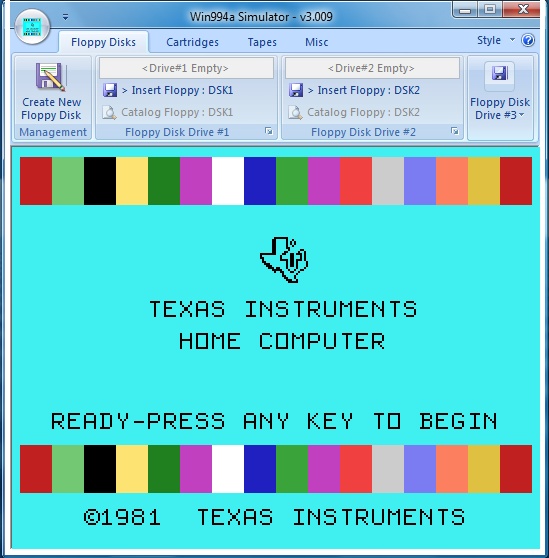
Win994a
is a TI-99/4A simulator written
by Cory Burr that installs and runs in the Windows
environment. It was written to simulate the
TI-99/4A, not to emulate it perfectly.
General
Functionality:
- Boots and runs all
console ROM and GROM based functions including console BASIC.
- CRU bits for the
keyboard are implemented; some CRU bits for the Disk Controller and
RS232 Interface are implemented.
- TMS9918a video chip
functionality is fully implemented.
- TMS9919 sound chip
functionality is fully implemented.
- TMS5220 speech
synthesizer chip data transport is fully implemented. Speech text is
displayed in a scrolling marquee, in addition to being spoken.
- Full floppy disk and
disk controller functionality.
- Full cassette tape
functionality for CS1.
- 32k Memory Expansion
supported.
- PIO and RS232 ports are
supported, but using a different method than the original TI99/4a.
- Support for two external
joysticks, or simulates one joystick input using numeric keypad.
- Runs over 200 cartridges
correctly. Cartridges that depend on non-implemented CRU bits
or non-documented video chip operation will fail. Other cartridges may fail due to bugs
in the Win994a Simulator (major author apology).
Specifics:
- All TMS9940 CPU
instructions are implemented. CPU clock ticks are accumulated
for both instructions and fast/slow memory accesses. When
enough clock ticks have been accumulated for 1/16 of a second real
elapsed time, Win994a checks its high precision clock and gives up
enough of the time slice so that accurate running time is maintained.
- Console based cassette
tape functions for CS1 supported.
- Console ROM and multiple
console GROM functionality implemented.
- Multiple peripheral
based ROMs supported.
- Multiple cartridge based
ROMs, GROMs, and RAM supported.
- TMS9918a: Uses DirectX
for all operations. Video modes GRAPHICS, TEXT, MULTICOLOR,
BITMAP, and BITMAP-TEXT are implemented. Sprites, sprite
coincidence, screen blanking, and vertical interrupt operations are
implemented.
- TMS9919: Uses
DirectSound for all operations. All three voices and noise
channel supported.
- TMS5220: Speech
synthesizer functions fully implemented. Speech text is displayed on a
scrolling marquee in addition to being spoken.
- Disk Controller and
three floppy drives fully supported.
- PIO and RS232 ports are
supported, but using a different method than the original TI99/4a.
PIO/1, PIO/2, RS232/1, RS232/2, RS232/3, and RS232/4 provide six
separate pathways for making printouts through Window's print system.
They do not provide input/output capabilities with the PC's actual
hardware ports.
- Support for two
externally connected joysticks, or simulates one joystick input using
the keyboard numeric keypad.
What's New In Versoin 3.010:
- This version of Win994a is fairly light on changes. Mainly, these
are technical internal modifications and most folks won't see any
difference.
- The "X" (eXecute) cpu opcode has been modified to function
correctly. In past versions, failure of this opcode caused several
cartridges to malfunction, often resulting in crashes and Win994a
reboots. Opcodes that set the "carry flag" were modified slightly.
- The Win994a Preferences Dialog has been modified to include a
fast 16bit access 32K Extended Memory option.
- The Disk Manager application has virtually stayed the same.
- The assembler application has been revised and updated to correct
a problem with the resulting machine code generated by a few
conditional branch op codes.
Download Win994a:
Note-
cart/disk/cassette
images are available in their own sections as
single downloads for those with slower connections. For those
with broadband, all of the images can be downloaded in single zip files
from the main Win994a page.
New!
4/2/13
Win994a
Simulator Download -
Version 3.010
Resources:
Win994a is unsupported
software, so a special help forum has been created:
Win994a
Support Forum
Please post any questions or comments here and perhaps other users can
provide some assistance.
HTML source © 2013 [email protected]
The
owner of this site does not guarantee or necessarily test any of the
programs or files available for download from the site. Downloading and
installing any files is done at your own risk.